Motion Studio gold-standardmotion design toolkit




Trusted worldwide in production workflows





Gold-standard Suite
Core interactions used in every session: one-click anchor point snapping, inline speed graph editing, fill/stroke color controls, and layer isolation via Focus groups. Used by professionals worldwide since 2013.
Pinned Tools
Tools and workflows can be pinned, re-ordered and removed in two special groups.
Anchor
Snap layer Anchor Points to bounding box margins in one-click.
Ease
Adjust keyframe speed by dragging your cursor in the graph, or using mirrored slider controls.
Anchor
Snap layer Anchor Points to bounding box margins in one-click.
Ease
Adjust keyframe speed by dragging your cursor in the graph, or using mirrored slider controls.
Color
Preview and manipulate color space with sliders and expanded controls.
Focus
Visually isolate selected layers in your timeline and composition.
Pinned Tools
Tools and workflows can be pinned, re-ordered and removed in two special groups.
Pages of Motion
Five dedicated pages inside the extension: advanced easing with cubic, speed, and influence graphs; Color for fill, stroke, hue, saturation, and vibrance controls; Focus for layer isolation and group management; a full Tools library browser; and a search page to find and launch any tool, setting, or recent action.
Search
Find and launch tools, settings, preferences and browse your recent tool runs.
Advanced Easing
Edit and manipulate keyframe speed, influence and value without visiting the Graph Editor.
Focus
Isolate and control layers and groups.
Advanced Easing
Edit and manipulate keyframe speed, influence and value without visiting the Graph Editor.
Focus
Isolate and control layers and groups.
Tools
The libary of all the tools and workflows in the Motion Studio extension.
Search
Find and launch tools, settings, preferences and browse your recent tool runs.
Deep Workflows
Full-page tools with their own sub-menus for tasks you repeat daily. Edit composition settings, scrub the timeline with custom frame snapping, generate and record particle simulations via Emitter, and save/re-apply keyframe sets with Re-Key.
Re-Key
Save, re-apply, re-time and share keyframes.
Composition
Preview and change composition settings with modern controls.
Timeline
Manage your work area and preview animation in a new scrub method.
Composition
Preview and change composition settings with modern controls.
Timeline
Manage your work area and preview animation in a new scrub method.
Emitter
Generate and record simulation assets, no rendering and instant playback.
Re-Key
Save, re-apply, re-time and share keyframes.
Everything Toolbox
Single-click tools that automate common actions: Delay for expression-based stagger, Falloff for distance-driven attenuation, Null for instant control rigs, Shapes for geometric primitives, and Sort to organize your project panel automatically.
Tools
The tools library is always getting new releases, like Re-Key, Grids and Key Assist — new methods to explore animation.
Delay
Universally control and stagger values across multiple layers with expression-based timing.
Falloff
Manipulate properties with spatial attenuation — animate values based on distance from a source.
Delay
Universally control and stagger values across multiple layers with expression-based timing.
Falloff
Manipulate properties with spatial attenuation — animate values based on distance from a source.
Null
Create invisible control objects and parent selected layers for cleaner rigs.
Shapes
Collection of geometric primitives — create pre-built shape layers with a single click.
Sort
Automatically sort and organize the project panel and all media content and folders.
Tools
The tools library is always getting new releases, like Re-Key, Grids and Key Assist — new methods to explore animation.
Studio Experience
The standalone desktop app manages your entire setup: install and update extensions, organize color palettes and easing libraries, build custom Mini panels, browse open-source vector assets, and configure Re-Key presets. Also includes Resolve Ease for DaVinci Resolve users.
Settings
As usual with Mt. Mograph software, there are complete Preferences and Settings to customize.
Extensions
Motion Studio can be installed as a single panel, or opened as multiple extension panels.
Color
Organize, sort and manage all your color palettes.
Extensions
Motion Studio can be installed as a single panel, or opened as multiple extension panels.
Color
Organize, sort and manage all your color palettes.
Easing
Manage and re-order all your ease palettes and create folders.
Vector
Use a massive library of royalty free and open source vectors in any program.
Re-Keys
Manage and re-order all your Re-Key, rename and add custom icons.
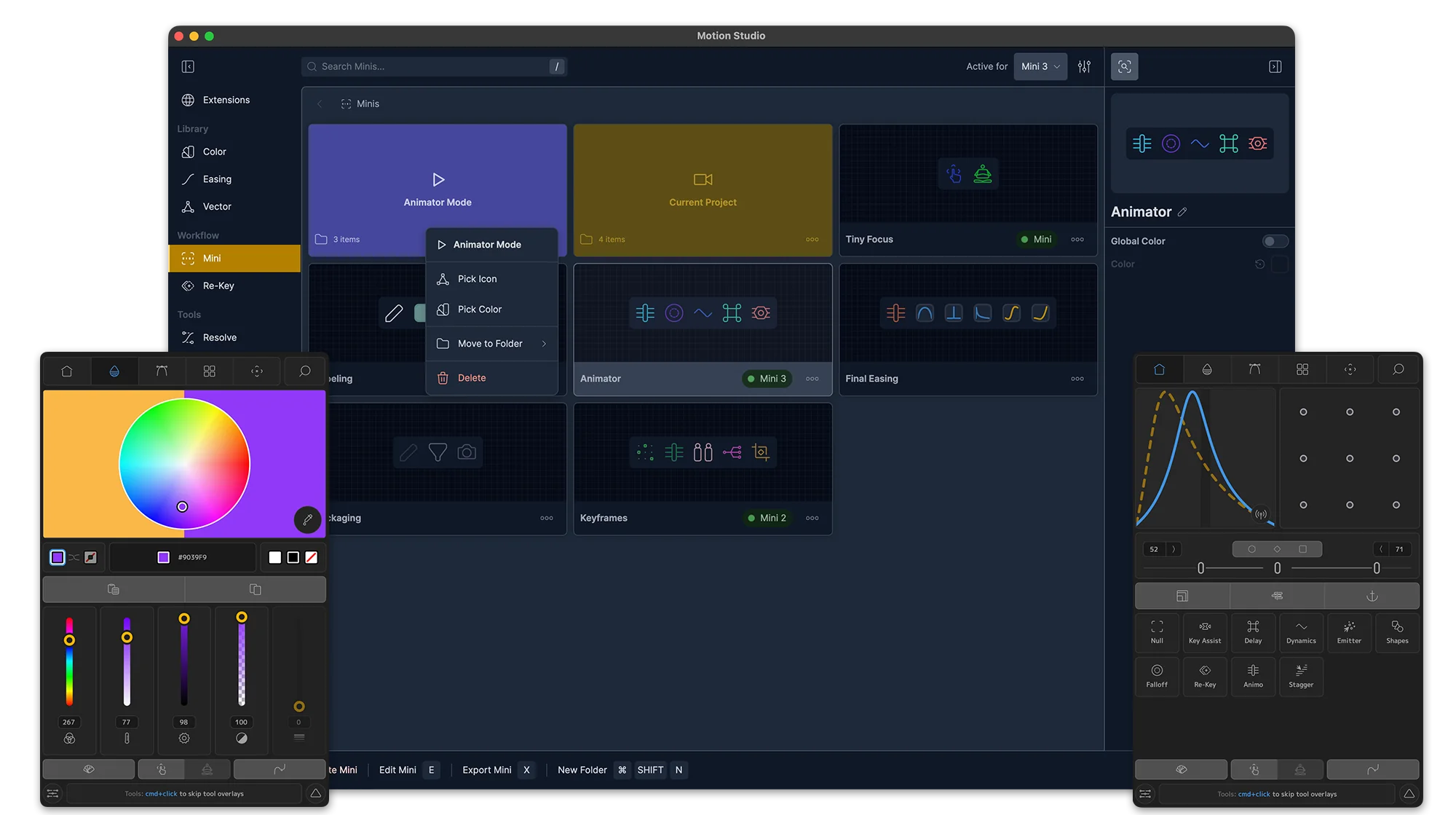
Mini
Create and customize minimal companion panels for Motion Studio tool, swatches, palettes, system commands and more.
Resolve Easing
For DaVinci Resolve + Fusion users, enjoy an enhanced graph editor and easing toolset.
Create
Motion Studio is expanding to an entire suite of interactive simulation tools with instant renders and complete library.
Settings
As usual with Mt. Mograph software, there are complete Preferences and Settings to customize.
Animation Assistant
Studio-exclusive tools for advanced workflows: Re-Key saves and recalls keyframe libraries, Mini panels give you lightweight custom toolbars, and Key Assist auto-sets bulk keyframes with a property listener.
Key-Assist
Auto-set bulk keyframes with a "property listener assistant."
Re-Key
Save and re-apply keyframes in a custom library.
Minis
Customize a lightweight companion extension of your favorite tools, libraries and After Effects system commands.
Re-Key
Save and re-apply keyframes in a custom library.
Minis
Customize a lightweight companion extension of your favorite tools, libraries and After Effects system commands.
Key-Assist
Auto-set bulk keyframes with a "property listener assistant."

Users say
“I use Motion on a daily basis, at first I was hesitant in buying it but it really became a workhorse in my process and After Effects will never be the same to me without it”
Sebastian M
Mano de obra
“If I was stranded on desert island and I was only allowed one after effects extension motion would be it.”
Nick W
@njw.png
“Essential part of your tool belt. Really a no-brainer.”
Anders Meisner
“The number of tools in Motion are astounding, and range from the why-isn't-this-already-part-of-After-Effects to the more esoteric. Every so often I will go back over some of the startup tutorials and inevitably a newly (re)discovered tool will suddenly become an indispensable part of my work flow.”
Mark R
Freelance CG Generalist
“Motion helps me get through more work in less time. Since everything is urgent it's become a lifesaver and a necessity.”
Jon
Deep Sea Creative
“Since 2014 I use motion for my everyday work. Is an essential tool and I feel it as oil for a car engine. Can't work without it”
Cris Vasquez
Gobernación de Córdoba, Colombia
“I can't work in After Effects without my Motion4 window open. If its not installed i have to install it before i work on a project”
Drew H
“Motion is the single greatest plugin I've ever used in my motion design and one of the best investments I've ever made in my motion career”
Joe H
@painting in pictures
“I edited my workspace in AE to have Motion already opened and ready to use. I use it on every single project, it's a time and life saver. They thought about everything and made a super tool that helps you basically with everything you have in mind.”
Simone Blax
@simoneblax
“I've been using Motion since V1 and it only gets better with every update. I use it for literally every project I work on, and it saves me endless precious clicks each day.”
Dana Stoof
“Motion has speeded up all my work processes for 10 years now and above all it freed me from a lot of stress. Thank you”
Lorenzo Delmati
“Motion consistently cuts my workload by 30%. It's a game changer and there's no going back- love all the new features that come after every update!”
Kasper K
“It is incredibly noticeable using a different machine that doesn't have Motion installed as it is so integrated into my workflow! I use it quite literally every day.”
Brett S
BAKSAYER.Design
“I've been using Motion since 2014. It an essential part of my workflow every day on every project. Everything from keyframe easing and animation to parenting, color and effects are more efficient to create and edit using Motion. Many other tools have come along in the past decade but nothing has taken the place of Motion for me.”
Adam P
“Every time I re-install Aftereffects, I feel naked without Motion. The anchor grid and ease tool alone is worth the full price!”
Nou H
“I've used Motion since 2018 basically every single day I work in AE. having so many obvious tools accessible in one tool while when needed the depth and advanced animations tools when needing more complex interconnected layers and animation.”
Cody Rowan
Rowan FX
“I tutor as a side hustle and always have my students of all levels install Motion. It's a must have.”
Evan Shwartz
@DishitDash on YouTube
“I LOVE Motion, it's become a regular part of my workflow and it's saved me SO MUCH time. Animation takes a lot of time as it is so anything to help speed things up is fantastic. I would recommend it to everyone that uses After Effects regularly. I particularly love the Sort function as I am very messy with all my folders and comps, so I don't feel bad if other people have to work with my files any more!”
Vicky
Freelance
“It is a great tool, I use it every day”
“It's one tool i've used for decades and love the anchor tool! Whenever I work on another machine without it, I lose time.”
Miguel Reyes
@pawyears
“If I had to choose ONLY ONE script/ external helper in After Effects, would be surely Motion.”
Rico Vilarouca
@Vilaroucas
“Motion is an absolutely essential plugin for any motion designer.”
Dima
Rocket Beans TV
“Amazing tool with superb support, with users being able to input into its development. Motion keeps growing and is a must have for any After Effects professional or hobbyist!”
Chris Lupton
Dead Ready Productions
“Motion really helped me as a freelance self-taught animator to get the job done more easily and effectively.”
Melvin Soto
Melvin Soto LLC
“Motion is integral to my workflow, without it, it is like pulling teeth”
Edwin V
EDAN Creative