Boombox visual audio mixing& extensive sfx library


Trusted worldwide in production workflows





45 packs & counting.
2,000+ searchable tags.
15,000+ sound effects.
Listen to all packs
The Library
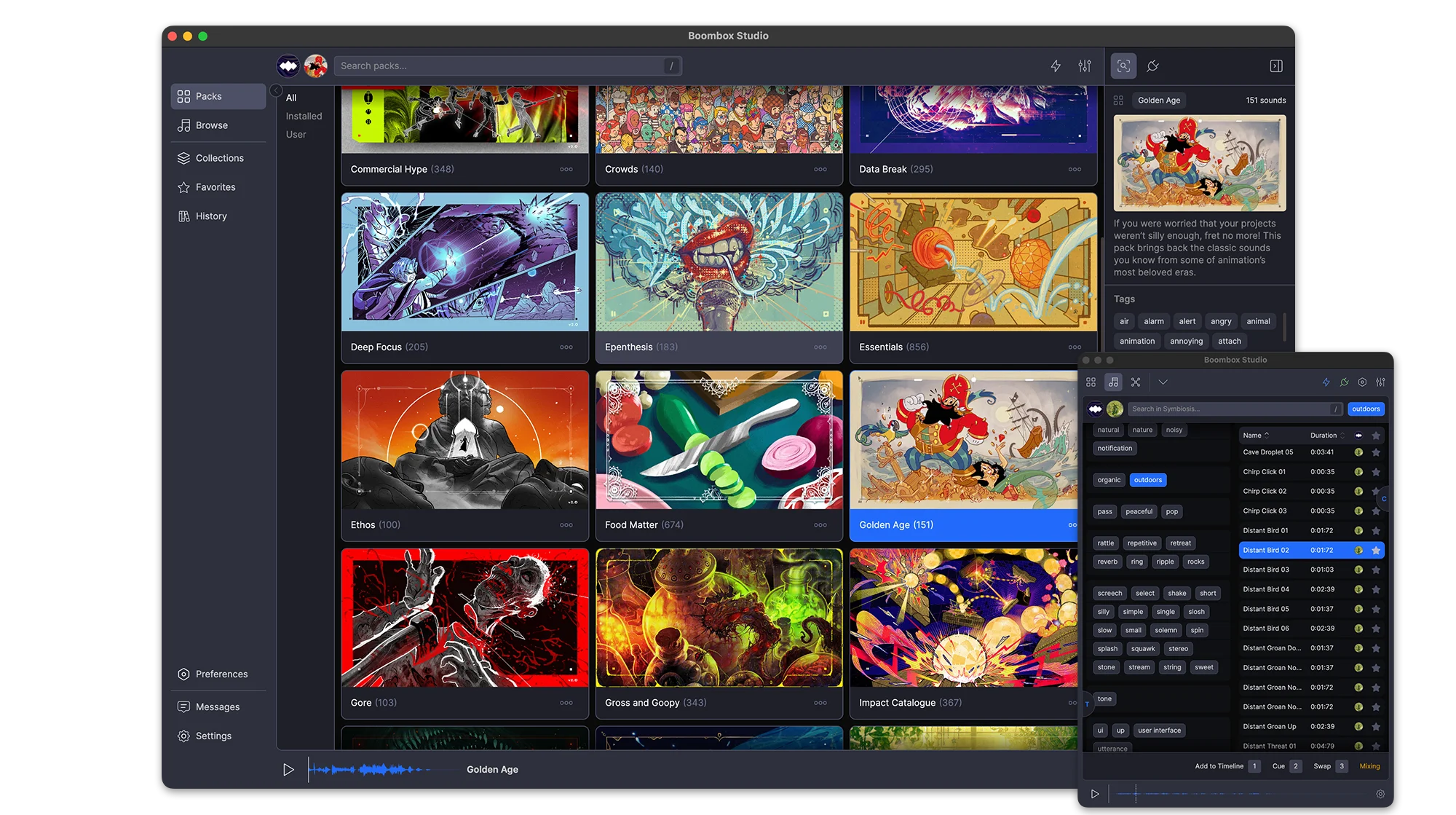
45 packs, 15,000+ sounds, 2,000+ tags, and every one of them plays before you download a thing. Sounds stream on demand, so you can audition the whole library first and only download the packs you keep.
Favorites
Favorite a sound from a pack, a search or your own imports and it collects in Favorites. One toggle shows only the starred ones.
Stream or Download
All 45 packs are playable the moment you open the app. Sounds stream on demand, so you can audition the entire library before downloading anything. Download the packs you keep and they play offline.
Search
One field searches sound names, packs and tags at once. Every result carries its pack, duration and full tag list
Stream or Download
All 45 packs are playable the moment you open the app. Sounds stream on demand, so you can audition the entire library before downloading anything. Download the packs you keep and they play offline.
Search
One field searches sound names, packs and tags at once. Every result carries its pack, duration and full tag list
Tags
Pick a tag and the panel narrows to the tags that still appear alongside it, so you are able to find SFX for anything
Filters
Narrow results by pack, by duration, or to favorites only. History filters by date instead.
Tabs
Search several packs at once. Each search keeps its own tab, named after what you searched for and holding its own filters and selection.
Packs
Every pack is produced and mixed by our award-winning composer, with its own (human-made) artwork, description, sound count and total runtime. New packs arrive regularly and sync in the background.
Favorites
Favorite a sound from a pack, a search or your own imports and it collects in Favorites. One toggle shows only the starred ones.
One-click Sync
Every sound carries a hand-picked Cue Point™ marking its impact. Add drops a sound at your playhead with the cue on that frame. Swap replaces a clip where it sits. Cue layers another sound onto the same moment. Set an Auto-Mix range and nothing lands at 0 dB dead center.
Auto-Mix
Set a volume and pan range once and everything you place lands inside it. Each parameter has its own switch, so you can randomize pan and leave volume alone.
Add
Every sound carries a hand-picked Cue Point™ marking its impact. Add drops the sound on the next free audio track with that cue landing on your playhead.
Swap
Wrong sound? Select the clip, pick another, hit Swap. The clip is replaced where it sits with its Cue Point™ on the same frame. No re-trimming, no nudging.
Add
Every sound carries a hand-picked Cue Point™ marking its impact. Add drops the sound on the next free audio track with that cue landing on your playhead.
Swap
Wrong sound? Select the clip, pick another, hit Swap. The clip is replaced where it sits with its Cue Point™ on the same frame. No re-trimming, no nudging.
Cue
Cue layers another sound onto a new track, aligned to the same Cue Point™ as the clip you have selected.
Auto-Mix
Set a volume and pan range once and everything you place lands inside it. Each parameter has its own switch, so you can randomize pan and leave volume alone.
Mixing
Every sound in your comp is a point in a dome, where distance from the center is volume and angle is pan. Drag a point and the clip on your timeline follows.
Audio Skins
Turn on Audio Skins and the selected sound draws lines to the ones before and after it, with arrows showing which way the mix is moving.
Constellation™
Your whole project becomes a constellation. Every sound takes a place in the field, and mixing is a matter of moving through that space until everything sits where it should.
The Project List
Every sound you’ve placed, with its volume on a slider and its pan on a knob, reading out in dB and degrees. Sort by any column, search within the comp, and select rows to mix them as a group.
Constellation™
Your whole project becomes a constellation. Every sound takes a place in the field, and mixing is a matter of moving through that space until everything sits where it should.
The Project List
Every sound you’ve placed, with its volume on a slider and its pan on a knob, reading out in dB and degrees. Sort by any column, search within the comp, and select rows to mix them as a group.
Auto-Mix & Distribute
Select the sounds, set a volume and pan range, and preview it as a wedge on the dome before you commit. Auto-Mix randomizes inside the range; Distribute spreads the selection evenly across it.
Audio Skins
Turn on Audio Skins and the selected sound draws lines to the ones before and after it, with arrows showing which way the mix is moving.
Thousands of searchable tags.
Your Packs
The 15,000 sounds are ours. Everything else is yours: import a folder of your own audio, tag and rename it inline, build packs for a project, and export one to hand to whoever is finishing the job.
History
Every sound you Add, Cue or Swap is written to History with the date it was used.
Import a Folder
Pick a folder of your own audio and Boombox builds a custom pack out of it, sitting alongside the 45 that ship with the app.
Export Packs
Any pack you build exports as a single file and imports again anywhere, tags and Cue Points™ intact.
Import a Folder
Pick a folder of your own audio and Boombox builds a custom pack out of it, sitting alongside the 45 that ship with the app.
Export Packs
Any pack you build exports as a single file and imports again anywhere, tags and Cue Points™ intact.
Favorites
Favorite the sounds you keep coming back to and find them again in the Favorites tab.
History
Every sound you Add, Cue or Swap is written to History with the date it was used.
Fits Your Setup
Boombox connects to After Effects, Premiere Pro, Audition and DaVinci Resolve, full-size beside your edit or docked as a narrow plugin panel. Preview volume matches After Effects dB exactly, and switching sounds no longer pops.
Preferences
A complete set of preferences and settings to customize Boombox to the way you work.
Plugin Mode
Run Boombox full-size beside your edit, or shrink it to a single column that fits a plugin dock. Toggle the tag panel and the Duration, Pack and Favorite columns, scale the UI, or drag a sound straight onto the timeline.
Preferences
A complete set of preferences and settings to customize Boombox to the way you work.
Plugin Mode
Run Boombox full-size beside your edit, or shrink it to a single column that fits a plugin dock. Toggle the tag panel and the Duration, Pack and Favorite columns, scale the UI, or drag a sound straight onto the timeline.
Preferences
A complete set of preferences and settings to customize Boombox to the way you work.
Users say
“Boombox facilitated me to do the sound mix for my animation projects with much ease, the best thing is that I don't have to leave After Effects to do so, highly recommended.”
Muhammad@ifaisalstudio
“I use it all the time when adding final touches, aka subtle SFXs to my project. Love how convenient it is, as I hate manually downloading every little sfx and dragging them inside premiere.”
Raphael T.
“Adding sound and sound effects and having them in order is now easy! I really do recommend boombox to anyone that uses sound in their animations!”
Tau.today
“I use Boombox literally every time i open After Effects or Premiere. This plugin was a bless to my workflow and SFX needs. I can't recommend it enough.”
Nicolas Chidem
“Boombox is essential for fast paced production environments. It gives instant access to an incredible library of useful sounds to enhance your work.”
Zach - Exposure Video
“Boombox is a great tool from early sound exploration in animatics to final mix for delivery. Extremely high quality and expansive library of sound effects that elevates my motion work.”
Jamie P - Melon Fresh Design
“Boombox is an absolutely essential part of my sound design process. Well stocked with a wide variety of sounds, intuitive controls and speedy as all get out. Boombox is the mic drop of audio.”
Josh Makes Motion
“Boombox is a big helper in my motion design and audio production workflow. I love that they put a really nice search, great keywording and really nice functions into a great and efficient UI that works in all different sizes of screen estate. Keep up the good work, Mt Mograph!”
Tom K, Vienna, Austria
“Boombox is one off my favorite extensions for AE. It's a robust and useful tool that I use every time I add the finishing touches to a project.”
Jose D.
“Boombox made it fun adding and arranging sound within After Effects.”
René Andritsch
“Boombox is so robust and full of high-quality sound effects. I use it on almost every project because it always has the sounds I'm looking for and the quality is spot on. They are frequently adding more sound packs. Highly recommend getting this one if you're in the business of making videos.”
Adam G. @ Go Video Go
“BoomBox has quickly become my favorite way to do sound design. I love the selection of sounds and how they are organized in a way that makes sense for motion designers like me. I rarely have to open other libraries these days!”
Timo @ Flying Colors
“Boombox is my go to source for sounds when working in AE. The easy licensing, user friendly UI, and large library of various sounds make it well worth the price.”
Zac @ zac landry designs
“Boombox is essential for the final sound design or even just the sound design concept in every project. The ease of timeline placement of the sounds is superb.”
crw photo motion
“Boombox is great extension that is a big step toward solving a tedious problem in motion design.”
Taylor Northrup Loyd
“Sound design is an essential part of finalizing an animation project. Boombox makes it crazy simple.”
Jesse Kinzer
“Boombox is a dalily tool I use on everyone of my projects. It's made my life easier and muy workflow faster”
Álvaro Jacome
“Boombox is one of those tools that makes a project so much more manageable. You know those times, when you're under deadline crunch and you need sound design NOW? Mt. Mograph has your back. It's saved me from the endless depths of internet searches so many times and is a huge value for the amount of free packs the team keeps putting out. Can't recommend it enough!”
Scott Fischer - Freelance Motion & Design (You can abbreviate if you prefer!)
“We were a growing motion graphics studio who really needed to step up our audio game quickly - this was an invaluable arrow in our quiver!”
Video Producer Sam, B2B Creative Agency
“I use a boombox for all of my work because it feels easy and not having to switch back and forth makes it faster. Worth the money spent”
dudy
“Boombox makes adding SFX fun and the ability to explore sounds so easily lets your creativity roam in the editor.”
Billy Wood
“Boombox is a Boom in a Box”
Mika @ VeryVertical
“I try to use Boombox every time i am working on mograph and 3d video. Mostly i got all needed sound, but sometimes there is no some simple things like thunder or door, or chain. Maybe it's problem of searching engine, i don't know. But every sound which is in library got very good quality.”
Dartr Nemec
“Boombox has become an indispensable tool in my creative process. With its seamless integration into Premiere, I find myself using it for almost every project I work on. The intuitive interface saves me a considerable amount of time, allowing me to focus on the artistry of my work. I find myself reaching for Boombox even over much pricier and bigger professional libraries, as its sounds are incredibly versatile and of exceptional professional quality. The diverse array of sounds in their library has truly elevated the quality of my projects”
Daniel Fainberg, sound designer
“I am from Mongolia using boombox since 2020, it is essential tool for creating value to my animations make it more understandable to consumers.”
Gen Z LAB