Motion Studio gold-standardmotion design toolkit


Trusted worldwide in production workflows





Gold-standard Suite
Core interactions used in every session: one-click anchor point snapping, inline speed graph editing, fill/stroke color controls, and layer isolation via Focus groups. Used by professionals worldwide since 2013.
Pinned Tools
Tools and workflows can be pinned, re-ordered and removed in two special groups.
Anchor
Snap layer Anchor Points to bounding box margins in one-click.
Ease
Adjust keyframe speed by dragging your cursor in the graph, or using mirrored slider controls.
Pages of Motion
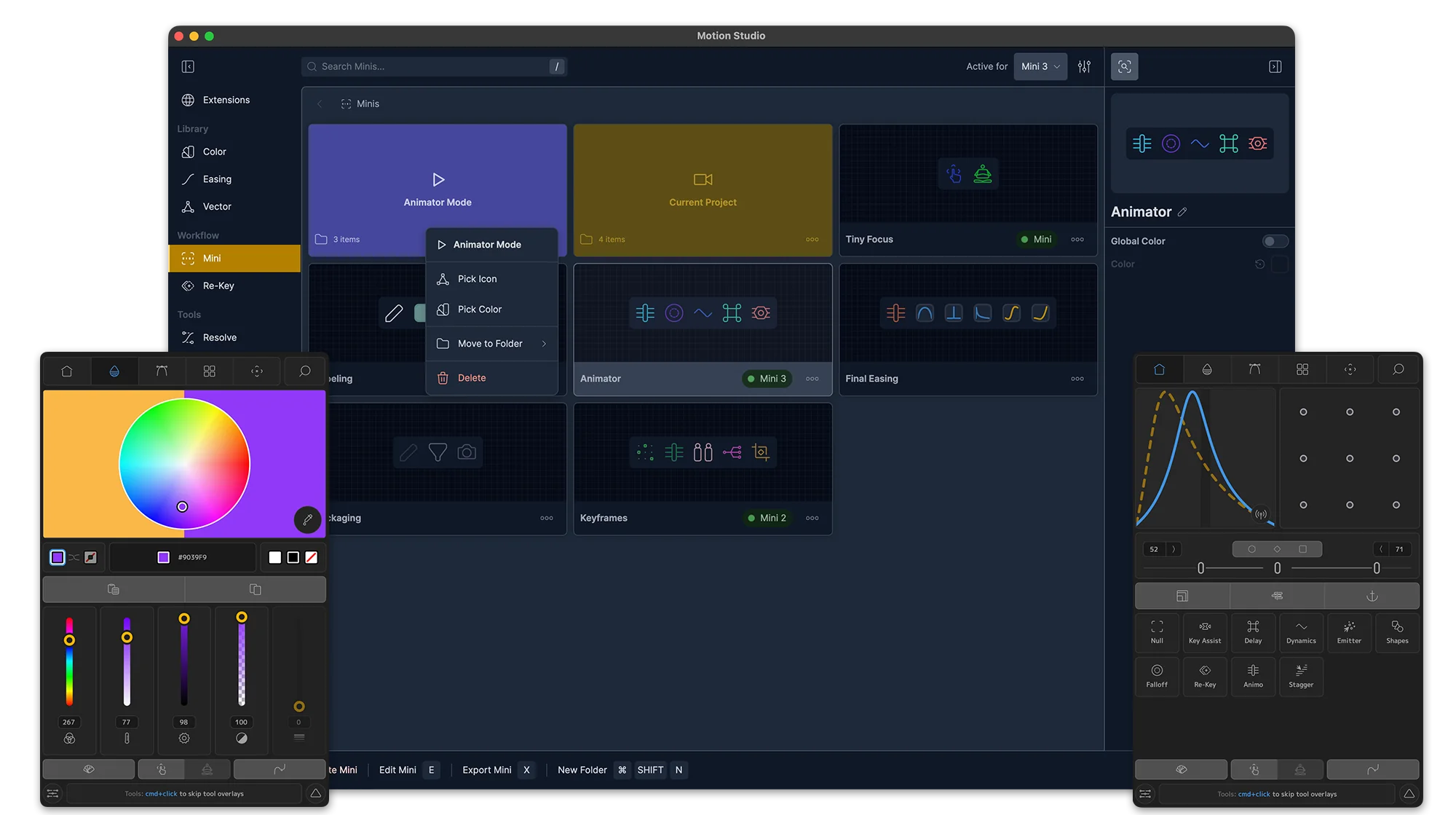
Five dedicated pages inside the extension: advanced easing with cubic, speed, and influence graphs; Color for fill, stroke, hue, saturation, and vibrance controls; Focus for layer isolation and group management; a full Tools library browser; and a search page to find and launch any tool, setting, or recent action.
Search
Find and launch tools, settings, preferences and browse your recent tool runs.
Advanced Easing
Edit and manipulate keyframe speed, influence and value without visiting the Graph Editor.
Focus
Isolate and control layers and groups.
Deep Workflows
Full-page tools with their own sub-menus for tasks you repeat daily. Edit composition settings, scrub the timeline with custom frame snapping, generate and record particle simulations via Emitter, and save/re-apply keyframe sets with Re-Key.
Re-Key
Save, re-apply, re-time and share keyframes.
Composition
Preview and change composition settings with modern controls.
Timeline
Manage your work area and preview animation in a new scrub method.
Everything Toolbox
Single-click tools that automate common actions: Delay for expression-based stagger, Falloff for distance-driven attenuation, Null for instant control rigs, Shapes for geometric primitives, and Sort to organize your project panel automatically.
Tools
The tools library is always getting new releases, like Re-Key, Grids and Key Assist — new methods to explore animation.
Delay
Universally control and stagger values across multiple layers with expression-based timing.
Falloff
Manipulate properties with spatial attenuation — animate values based on distance from a source.
Studio Experience
The standalone desktop app manages your entire setup: install and update extensions, organize color palettes and easing libraries, build custom Mini panels, browse open-source vector assets, and configure Re-Key presets. Also includes Resolve Ease for DaVinci Resolve users.
Settings
As usual with Mt. Mograph software, there are complete Preferences and Settings to customize.
Extensions
Motion Studio can be installed as a single panel, or opened as multiple extension panels.
Color
Organize, sort and manage all your color palettes.
Animation Assistant
Studio-exclusive tools for advanced workflows: Re-Key saves and recalls keyframe libraries, Mini panels give you lightweight custom toolbars, and Key Assist auto-sets bulk keyframes with a property listener.
Key-Assist
Auto-set bulk keyframes with a "property listener assistant."
Re-Key
Save and re-apply keyframes in a custom library.
Minis
Customize a lightweight companion extension of your favorite tools, libraries and After Effects system commands.
