Boombox visual audio mixing& extensive sfx library



Trusted worldwide in production workflows





45 packs & counting.
2,000+ searchable tags.
15,000+ sound effects.
Listen to all packs
The Library
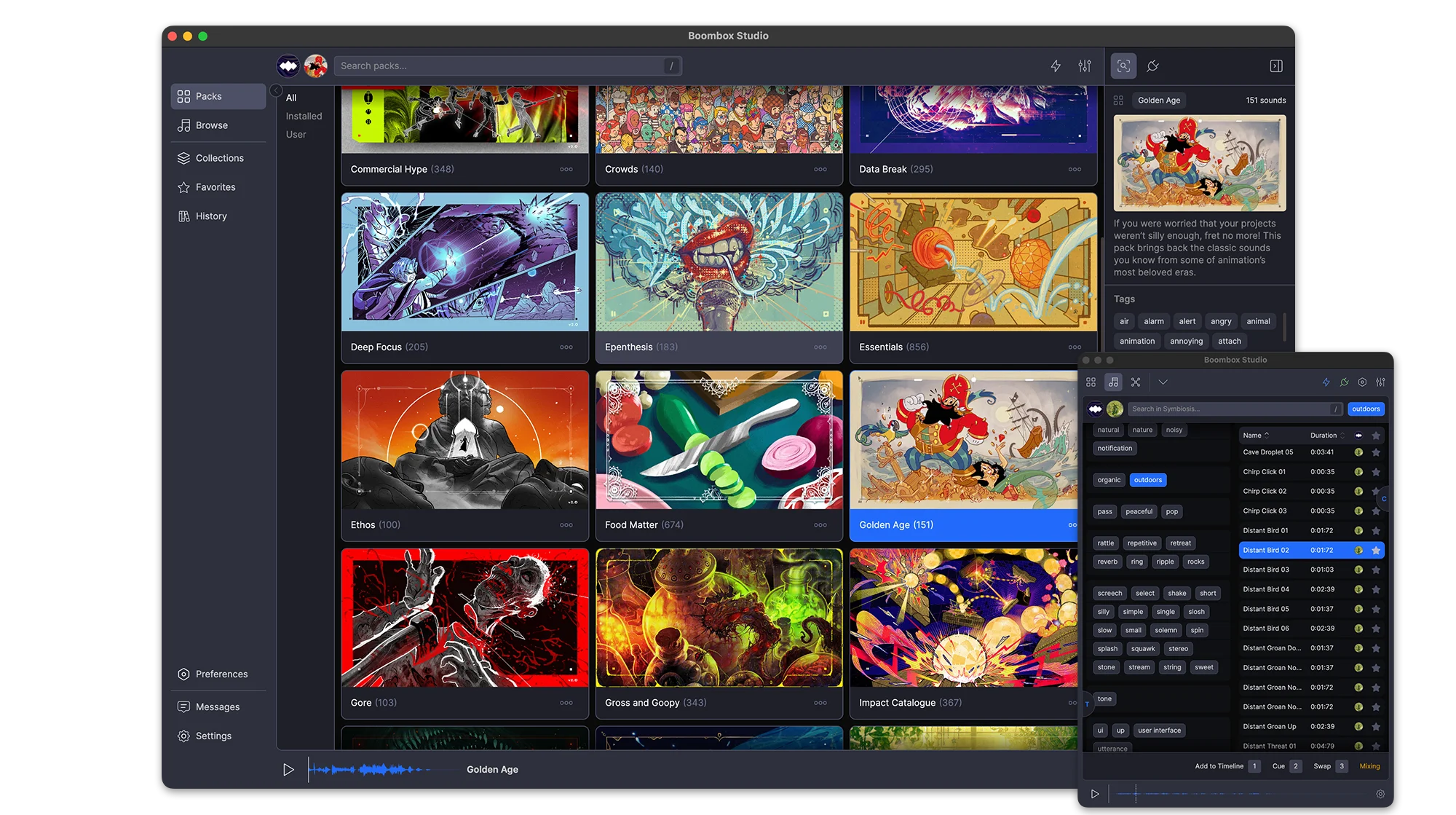
45 packs, 15,000+ sounds, 2,000+ tags, and every one of them plays before you download a thing. Sounds stream on demand, so you can audition the whole library first and only download the packs you keep.
Favorites
Favorite a sound from a pack, a search or your own imports and it collects in Favorites. One toggle shows only the starred ones.
Stream or Download
All 45 packs are playable the moment you open the app. Sounds stream on demand, so you can audition the entire library before downloading anything. Download the packs you keep and they play offline.
Search
One field searches sound names, packs and tags at once. Every result carries its pack, duration and full tag list
Stream or Download
All 45 packs are playable the moment you open the app. Sounds stream on demand, so you can audition the entire library before downloading anything. Download the packs you keep and they play offline.
Search
One field searches sound names, packs and tags at once. Every result carries its pack, duration and full tag list
Tags
Pick a tag and the panel narrows to the tags that still appear alongside it, so you are able to find SFX for anything
Filters
Narrow results by pack, by duration, or to favorites only. History filters by date instead.
Tabs
Search several packs at once. Each search keeps its own tab, named after what you searched for and holding its own filters and selection.
Packs
Every pack is produced and mixed by our award-winning composer, with its own (human-made) artwork, description, sound count and total runtime. New packs arrive regularly and sync in the background.
Favorites
Favorite a sound from a pack, a search or your own imports and it collects in Favorites. One toggle shows only the starred ones.
One-click Sync
Every sound carries a hand-picked Cue Point™ marking its impact. Add drops a sound at your playhead with the cue on that frame. Swap replaces a clip where it sits. Cue layers another sound onto the same moment. Set an Auto-Mix range and nothing lands at 0 dB dead center.
Auto-Mix
Set a volume and pan range once and everything you place lands inside it. Each parameter has its own switch, so you can randomize pan and leave volume alone.
Add
Every sound carries a hand-picked Cue Point™ marking its impact. Add drops the sound on the next free audio track with that cue landing on your playhead.
Swap
Wrong sound? Select the clip, pick another, hit Swap. The clip is replaced where it sits with its Cue Point™ on the same frame. No re-trimming, no nudging.
Add
Every sound carries a hand-picked Cue Point™ marking its impact. Add drops the sound on the next free audio track with that cue landing on your playhead.
Swap
Wrong sound? Select the clip, pick another, hit Swap. The clip is replaced where it sits with its Cue Point™ on the same frame. No re-trimming, no nudging.
Cue
Cue layers another sound onto a new track, aligned to the same Cue Point™ as the clip you have selected.
Auto-Mix
Set a volume and pan range once and everything you place lands inside it. Each parameter has its own switch, so you can randomize pan and leave volume alone.
Mixing
Every sound in your comp is a point in a dome, where distance from the center is volume and angle is pan. Drag a point and the clip on your timeline follows.
Audio Skins
Turn on Audio Skins and the selected sound draws lines to the ones before and after it, with arrows showing which way the mix is moving.
Constellation™
Your whole project becomes a constellation. Every sound takes a place in the field, and mixing is a matter of moving through that space until everything sits where it should.
The Project List
Every sound you’ve placed, with its volume on a slider and its pan on a knob, reading out in dB and degrees. Sort by any column, search within the comp, and select rows to mix them as a group.
Constellation™
Your whole project becomes a constellation. Every sound takes a place in the field, and mixing is a matter of moving through that space until everything sits where it should.
The Project List
Every sound you’ve placed, with its volume on a slider and its pan on a knob, reading out in dB and degrees. Sort by any column, search within the comp, and select rows to mix them as a group.
Auto-Mix & Distribute
Select the sounds, set a volume and pan range, and preview it as a wedge on the dome before you commit. Auto-Mix randomizes inside the range; Distribute spreads the selection evenly across it.
Audio Skins
Turn on Audio Skins and the selected sound draws lines to the ones before and after it, with arrows showing which way the mix is moving.
Thousands of searchable tags.
Your Packs
The 15,000 sounds are ours. Everything else is yours: import a folder of your own audio, tag and rename it inline, build packs for a project, and export one to hand to whoever is finishing the job.
History
Every sound you Add, Cue or Swap is written to History with the date it was used.
Import a Folder
Pick a folder of your own audio and Boombox builds a custom pack out of it, sitting alongside the 45 that ship with the app.
Export Packs
Any pack you build exports as a single file and imports again anywhere, tags and Cue Points™ intact.
Import a Folder
Pick a folder of your own audio and Boombox builds a custom pack out of it, sitting alongside the 45 that ship with the app.
Export Packs
Any pack you build exports as a single file and imports again anywhere, tags and Cue Points™ intact.
Favorites
Favorite the sounds you keep coming back to and find them again in the Favorites tab.
History
Every sound you Add, Cue or Swap is written to History with the date it was used.
Fits Your Setup
Boombox connects to After Effects, Premiere Pro, Audition and DaVinci Resolve, full-size beside your edit or docked as a narrow plugin panel. Preview volume matches After Effects dB exactly, and switching sounds no longer pops.
Preferences
A complete set of preferences and settings to customize Boombox to the way you work.
Plugin Mode
Run Boombox full-size beside your edit, or shrink it to a single column that fits a plugin dock. Toggle the tag panel and the Duration, Pack and Favorite columns, scale the UI, or drag a sound straight onto the timeline.
Preferences
A complete set of preferences and settings to customize Boombox to the way you work.
Plugin Mode
Run Boombox full-size beside your edit, or shrink it to a single column that fits a plugin dock. Toggle the tag panel and the Duration, Pack and Favorite columns, scale the UI, or drag a sound straight onto the timeline.
Preferences
A complete set of preferences and settings to customize Boombox to the way you work.
Users say
“Boombox is a great tool to have right inside of After Effects. Quality sounds add professionalism to any project.”
S. Hemphill
“I use this plugin EVERY SINGLE day as an editor. Game changer for me.”
Harveygibson.uk
“Saves a lot of time and money.”
Ibrahim BAM
“Boom box is an essential part of my editing workflow, quick and easy to use and the ever expanding library keeps me coming back again and again.”
James Rafferty
“Boombox is one of those plugins that, once installed and used, you can't do without. It's a tool designed to collaborate with you. Adding that extra ingredient to the production process that makes things "POP!" The user interface is appealing, the sounds are of high quality, and the ease of use is exactly what bundled plugins should be like.”
camilo @commercetools
“All of three are huge time-savers, once you get comfortable it can save hours.”
“Boombox is very efficient for quick search and add of audio design.”
Randel @differentscenario
“Boombax changed the way I search and find sfxs. Without any doubt the most complete and easy Sfx Library out there!”
Valerio Galli @ Big Productions
“Enjoy using Boombox. It is easy and flexible, and it also contains thousands of sounds”
montaser abdullatif
“Boombox is my go to source for sounds when working in AE. The easy licensing, user friendly UI, and large library of various sounds make it well worth the price.”
Zac @ zac landry designs
“If you want your animations to sound cool and you want to save you money and sanity get BOOMBOX. all inside AE. all sounds you need and it gets updated all the time!!”
Tasos Mpougkis
“As a motion designer, it's fun and easy to make sound design with boombox !”
“Boombox helps make my animation stand out. Sound makes videos much more engaging, and with Boombox, adding SFX is quick and easy.”
Marysia
“Sound design is an essential part of finalizing an animation project. Boombox makes it crazy simple.”
Jesse Kinzer
“Boombox is a Boom in a Box”
Mika @ VeryVertical
“Boombox is always coming in clutch with the sfx to make the reaction from people seeing the animations from "nice" to "damn!!!" It helps add life to an animation and push it to the next level.”
Tsuriel.co
“I use it all the time when adding final touches, aka subtle SFXs to my project. Love how convenient it is, as I hate manually downloading every little sfx and dragging them inside premiere.”
Raphael T.
“Boombox saved me so much time doing sound design. Everything is right inside Premiere, rather than roundtripping out to an SFX library site, listening, downloading, importing, testing, purchasing, re-downloading and replacing...FOR EVERY SINGLE SOUND. Boombox is an incredible idea and a great execution on that idea. Gamechanger.”
Chris Lones - Lones Productions
“I am a creative by day and an experimental animator by night. Boombox has made finding and adding sounds so much easier. There's a lot of good stuff in those packs.”
Nix
“Adding sound and sound effects and having them in order is now easy! I really do recommend boombox to anyone that uses sound in their animations!”
Tau.today
“Boombox helps me a lot to be faster and delivery videos to my customers”
@coleta1994
“Boombox is without a doubt the easiest way to add sound effects to your project. Period.”
Erik at Momotion
“Boombox is great extension that is a big step toward solving a tedious problem in motion design.”
Taylor Northrup Loyd
“I love using Boombox. It's so convenient to have a large sound effects library right in Premiere. So easy to find and add sound effects for all of my projects.”
Kit Sinclair - Freelance Motion Designer
“Great UI, easy to work with. Could use some more subtle sounds but overall good bang for your buck.”
Ruzd @ Monster Match Studios