Boombox visual audio mixing& extensive sfx library


Trusted worldwide in production workflows





45 packs & counting.
2,000+ searchable tags.
15,000+ sound effects.
Listen to all packs
The Library
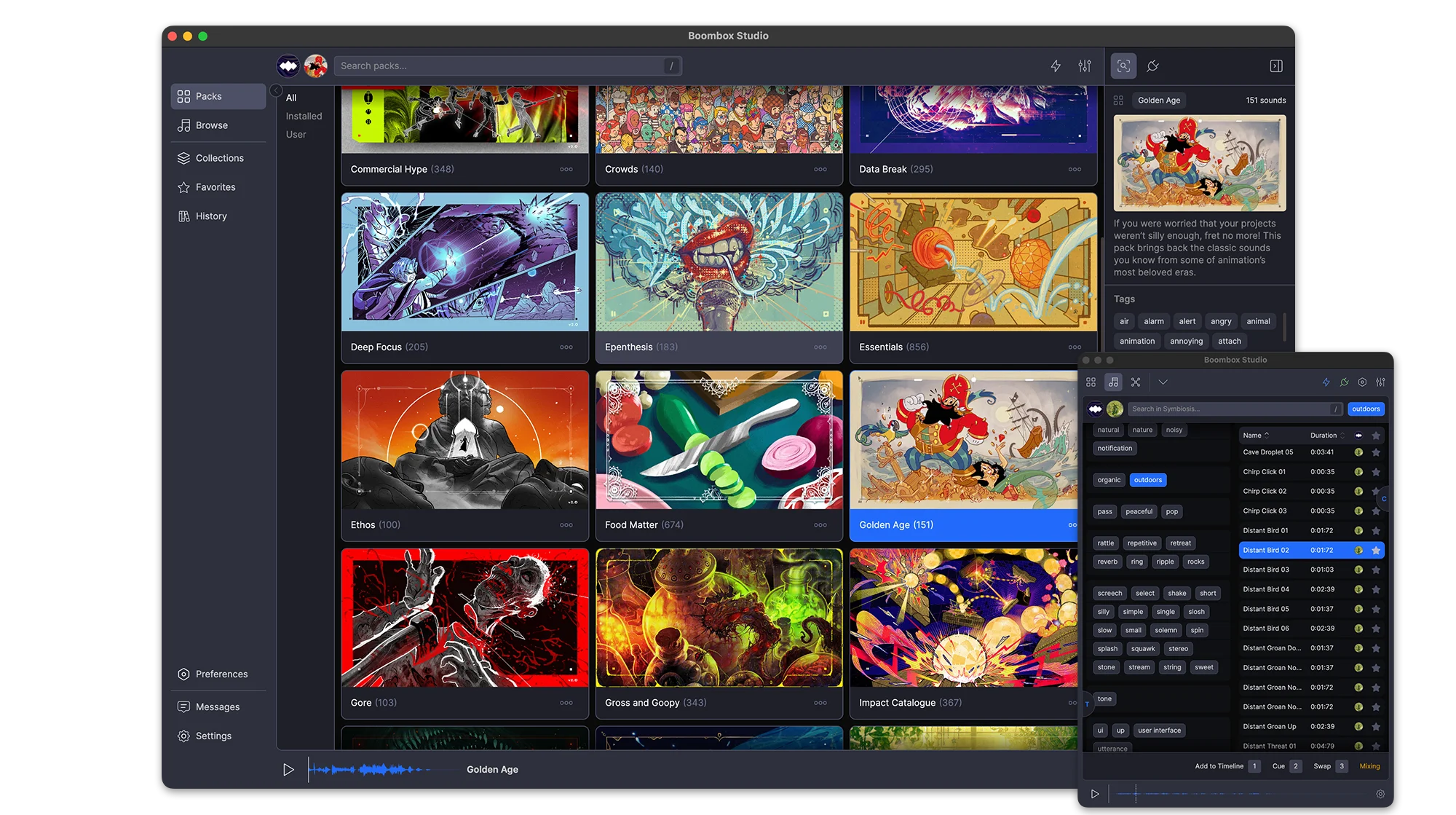
45 packs, 15,000+ sounds, 2,000+ tags, and every one of them plays before you download a thing. Sounds stream on demand, so you can audition the whole library first and only download the packs you keep.
Favorites
Favorite a sound from a pack, a search or your own imports and it collects in Favorites. One toggle shows only the starred ones.
Stream or Download
All 45 packs are playable the moment you open the app. Sounds stream on demand, so you can audition the entire library before downloading anything. Download the packs you keep and they play offline.
Search
One field searches sound names, packs and tags at once. Every result carries its pack, duration and full tag list
Stream or Download
All 45 packs are playable the moment you open the app. Sounds stream on demand, so you can audition the entire library before downloading anything. Download the packs you keep and they play offline.
Search
One field searches sound names, packs and tags at once. Every result carries its pack, duration and full tag list
Tags
Pick a tag and the panel narrows to the tags that still appear alongside it, so you are able to find SFX for anything
Filters
Narrow results by pack, by duration, or to favorites only. History filters by date instead.
Tabs
Search several packs at once. Each search keeps its own tab, named after what you searched for and holding its own filters and selection.
Packs
Every pack is produced and mixed by our award-winning composer, with its own (human-made) artwork, description, sound count and total runtime. New packs arrive regularly and sync in the background.
Favorites
Favorite a sound from a pack, a search or your own imports and it collects in Favorites. One toggle shows only the starred ones.
One-click Sync
Every sound carries a hand-picked Cue Point™ marking its impact. Add drops a sound at your playhead with the cue on that frame. Swap replaces a clip where it sits. Cue layers another sound onto the same moment. Set an Auto-Mix range and nothing lands at 0 dB dead center.
Auto-Mix
Set a volume and pan range once and everything you place lands inside it. Each parameter has its own switch, so you can randomize pan and leave volume alone.
Add
Every sound carries a hand-picked Cue Point™ marking its impact. Add drops the sound on the next free audio track with that cue landing on your playhead.
Swap
Wrong sound? Select the clip, pick another, hit Swap. The clip is replaced where it sits with its Cue Point™ on the same frame. No re-trimming, no nudging.
Add
Every sound carries a hand-picked Cue Point™ marking its impact. Add drops the sound on the next free audio track with that cue landing on your playhead.
Swap
Wrong sound? Select the clip, pick another, hit Swap. The clip is replaced where it sits with its Cue Point™ on the same frame. No re-trimming, no nudging.
Cue
Cue layers another sound onto a new track, aligned to the same Cue Point™ as the clip you have selected.
Auto-Mix
Set a volume and pan range once and everything you place lands inside it. Each parameter has its own switch, so you can randomize pan and leave volume alone.
Mixing
Every sound in your comp is a point in a dome, where distance from the center is volume and angle is pan. Drag a point and the clip on your timeline follows.
Audio Skins
Turn on Audio Skins and the selected sound draws lines to the ones before and after it, with arrows showing which way the mix is moving.
Constellation™
Your whole project becomes a constellation. Every sound takes a place in the field, and mixing is a matter of moving through that space until everything sits where it should.
The Project List
Every sound you’ve placed, with its volume on a slider and its pan on a knob, reading out in dB and degrees. Sort by any column, search within the comp, and select rows to mix them as a group.
Constellation™
Your whole project becomes a constellation. Every sound takes a place in the field, and mixing is a matter of moving through that space until everything sits where it should.
The Project List
Every sound you’ve placed, with its volume on a slider and its pan on a knob, reading out in dB and degrees. Sort by any column, search within the comp, and select rows to mix them as a group.
Auto-Mix & Distribute
Select the sounds, set a volume and pan range, and preview it as a wedge on the dome before you commit. Auto-Mix randomizes inside the range; Distribute spreads the selection evenly across it.
Audio Skins
Turn on Audio Skins and the selected sound draws lines to the ones before and after it, with arrows showing which way the mix is moving.
Thousands of searchable tags.
Your Packs
The 15,000 sounds are ours. Everything else is yours: import a folder of your own audio, tag and rename it inline, build packs for a project, and export one to hand to whoever is finishing the job.
History
Every sound you Add, Cue or Swap is written to History with the date it was used.
Import a Folder
Pick a folder of your own audio and Boombox builds a custom pack out of it, sitting alongside the 45 that ship with the app.
Export Packs
Any pack you build exports as a single file and imports again anywhere, tags and Cue Points™ intact.
Import a Folder
Pick a folder of your own audio and Boombox builds a custom pack out of it, sitting alongside the 45 that ship with the app.
Export Packs
Any pack you build exports as a single file and imports again anywhere, tags and Cue Points™ intact.
Favorites
Favorite the sounds you keep coming back to and find them again in the Favorites tab.
History
Every sound you Add, Cue or Swap is written to History with the date it was used.
Fits Your Setup
Boombox connects to After Effects, Premiere Pro, Audition and DaVinci Resolve, full-size beside your edit or docked as a narrow plugin panel. Preview volume matches After Effects dB exactly, and switching sounds no longer pops.
Preferences
A complete set of preferences and settings to customize Boombox to the way you work.
Plugin Mode
Run Boombox full-size beside your edit, or shrink it to a single column that fits a plugin dock. Toggle the tag panel and the Duration, Pack and Favorite columns, scale the UI, or drag a sound straight onto the timeline.
Preferences
A complete set of preferences and settings to customize Boombox to the way you work.
Plugin Mode
Run Boombox full-size beside your edit, or shrink it to a single column that fits a plugin dock. Toggle the tag panel and the Duration, Pack and Favorite columns, scale the UI, or drag a sound straight onto the timeline.
Preferences
A complete set of preferences and settings to customize Boombox to the way you work.
Users say
“Boombox is a amazing way to search for SFX right in AE and line it up straight away without hassle.”
“Boombox is an incredible diverse library that will have you covered for 99% of sounds you ever need. They sounds are pretagged and in libraries that make esnes and the sounds are top notch. I use this plugin more than anything in AE. SO good and at that price i am so thankful for Mt mograph and Boombox.”
Ben H
“What Mt. Mograph has done with all their plugins is unseen anywhere else. Boombox is another one of their plugins that exceeds and redefines expectations of what your software, and you, can do and the time you can do it in! Clean UI, seamless integration and great, professionally polished sound packs included in the box; it's worth its weight in gold many times over!”
Izzy R. @ Hototo Films
“Boombox has been a timesaver on my projects. Each and every sound effect I need, I can find it there.”
José Guimarães
“Boombox is a Boom in a Box”
Mika @ VeryVertical
“Boombox is an incredibly handy tool to have, and with its wide variety of sound packs, I've always been able to find what I needed.”
pprmint.
“Although I don't do SFX often, when I do I'm mighty glad Boombox exists. Knowing I have a huge library of high quality sounds right at my fingertips is always a relief!”
Latham Arnott
“I use a boombox for all of my work because it feels easy and not having to switch back and forth makes it faster. Worth the money spent”
dudy
“Whenever I want to add sound fx to a project, Boombox is always my very first stop. Its integration with AE is top drawer.”
Daniel
“The range and quality of sounds in Boombox is quite nice, although truth be told, the UI is rather cryptic & clunky. But overall... good stuff!”
Jay Kaslo
“Boombox facilitated me to do the sound mix for my animation projects with much ease, the best thing is that I don't have to leave After Effects to do so, highly recommended.”
Muhammad@ifaisalstudio
“Boombox has become an indispensable tool in my motion design and content creation toolkit. As a professional animator, I use After Effects every day, and Boombox seamlessly enhances my projects with its comprehensive sound design toolkit and expansive audio library. Saving me valuable time and elevating the overall production value of my work. Whether I'm crafting dynamic animations or engaging promotional content, Boombox consistently delivers in streamlining my workflow. I recommend Boombox to fellow animators and motion designers—it's a game-changer that adds a new dimension to creative storytelling.”
Mateo Baldasare @mateobaldasare
“Boombox is a great tool from early sound exploration in animatics to final mix for delivery. Extremely high quality and expansive library of sound effects that elevates my motion work.”
Jamie P - Melon Fresh Design
“Boombox makes adding SFX fun and the ability to explore sounds so easily lets your creativity roam in the editor.”
Billy Wood
“Last week a client asked if it was feasible to add sound design to a mograph ad we're working on. I did it using Boombox and turned it around same day, making extra cash on the project without even leaving After Effects.”
Luis Medrano @ COLORAMA.TV
“Boombox is an essential part of finishing off my animation projects”
Coen @ Coendeurloo.com
“Sound design is an essential part of finalizing an animation project. Boombox makes it crazy simple.”
Jesse Kinzer
“Boombox is an absolute game-changer. It's incredibly intuitive to use, and the efficiency is off the charts. It's streamlined my workflow like nothing else, allowing me to achieve studio-quality sound with just a few clicks. Highly recommend for anyone looking to elevate their video production.”
herbert
“As a motion designer, it's fun and easy to make sound design with boombox !”
“Boom box is an essential part of my editing workflow, quick and easy to use and the ever expanding library keeps me coming back again and again.”
James Rafferty
“Boombox changed my workflow completely before I went on five different sites, finding CC0 sounds, editing them, and adding them to my project. now I just search boombox and add the perfect sound in seconds”
Alec F.
“Boombox has been a vital part of my motion graphics workflow for the last 5 years. In this time, it's only become stronger and even more vital to my projects. The library has grown considerably and it is dumbfoundingly easy to use. It's surprising that BB isn't a native feature of the software to begin with. Fine work, team!”
Dustin Veitch
“Boombox made it fun adding and arranging sound within After Effects.”
René Andritsch
“I am a motion designer, and have worked as the sole video person on the in-house design teams I've been on for the last 6 years. So I don't consider myself a true sound designer, but do it myself as I don't generally have budget to hire that out. This is the most essential, groundbreaking, game changing piece of software I've used in sound design. It has completely revolutionized the way I do sound design and I absolutely love it. I've gone from a folder of 20k+, unorganized, and annoying to search sound effects, to completely archiving that and relying entirely on this. The quality of sounds, the ease of navigation, the panel directly inside my application. It can't be beat.”
David Lund
“Boombox is an absolutely essential part of my sound design process. Well stocked with a wide variety of sounds, intuitive controls and speedy as all get out. Boombox is the mic drop of audio.”
Josh Makes Motion