Motion Studio gold-standardmotion design toolkit



Trusted worldwide in production workflows





Gold-standard Suite
Core interactions used in every session: one-click anchor point snapping, inline speed graph editing, fill/stroke color controls, and layer isolation via Focus groups. Used by professionals worldwide since 2013.
Pinned Tools
Tools and workflows can be pinned, re-ordered and removed in two special groups.
Anchor
Snap layer Anchor Points to bounding box margins in one-click.
Ease
Adjust keyframe speed by dragging your cursor in the graph, or using mirrored slider controls.
Anchor
Snap layer Anchor Points to bounding box margins in one-click.
Ease
Adjust keyframe speed by dragging your cursor in the graph, or using mirrored slider controls.
Color
Preview and manipulate color space with sliders and expanded controls.
Focus
Visually isolate selected layers in your timeline and composition.
Pinned Tools
Tools and workflows can be pinned, re-ordered and removed in two special groups.
Pages of Motion
Five dedicated pages inside the extension: advanced easing with cubic, speed, and influence graphs; Color for fill, stroke, hue, saturation, and vibrance controls; Focus for layer isolation and group management; a full Tools library browser; and a search page to find and launch any tool, setting, or recent action.
Search
Find and launch tools, settings, preferences and browse your recent tool runs.
Advanced Easing
Edit and manipulate keyframe speed, influence and value without visiting the Graph Editor.
Focus
Isolate and control layers and groups.
Advanced Easing
Edit and manipulate keyframe speed, influence and value without visiting the Graph Editor.
Focus
Isolate and control layers and groups.
Tools
The libary of all the tools and workflows in the Motion Studio extension.
Search
Find and launch tools, settings, preferences and browse your recent tool runs.
Deep Workflows
Full-page tools with their own sub-menus for tasks you repeat daily. Edit composition settings, scrub the timeline with custom frame snapping, generate and record particle simulations via Emitter, and save/re-apply keyframe sets with Re-Key.
Re-Key
Save, re-apply, re-time and share keyframes.
Composition
Preview and change composition settings with modern controls.
Timeline
Manage your work area and preview animation in a new scrub method.
Composition
Preview and change composition settings with modern controls.
Timeline
Manage your work area and preview animation in a new scrub method.
Emitter
Generate and record simulation assets, no rendering and instant playback.
Re-Key
Save, re-apply, re-time and share keyframes.
Everything Toolbox
Single-click tools that automate common actions: Delay for expression-based stagger, Falloff for distance-driven attenuation, Null for instant control rigs, Shapes for geometric primitives, and Sort to organize your project panel automatically.
Tools
The tools library is always getting new releases, like Re-Key, Grids and Key Assist — new methods to explore animation.
Delay
Universally control and stagger values across multiple layers with expression-based timing.
Falloff
Manipulate properties with spatial attenuation — animate values based on distance from a source.
Delay
Universally control and stagger values across multiple layers with expression-based timing.
Falloff
Manipulate properties with spatial attenuation — animate values based on distance from a source.
Null
Create invisible control objects and parent selected layers for cleaner rigs.
Shapes
Collection of geometric primitives — create pre-built shape layers with a single click.
Sort
Automatically sort and organize the project panel and all media content and folders.
Tools
The tools library is always getting new releases, like Re-Key, Grids and Key Assist — new methods to explore animation.
Studio Experience
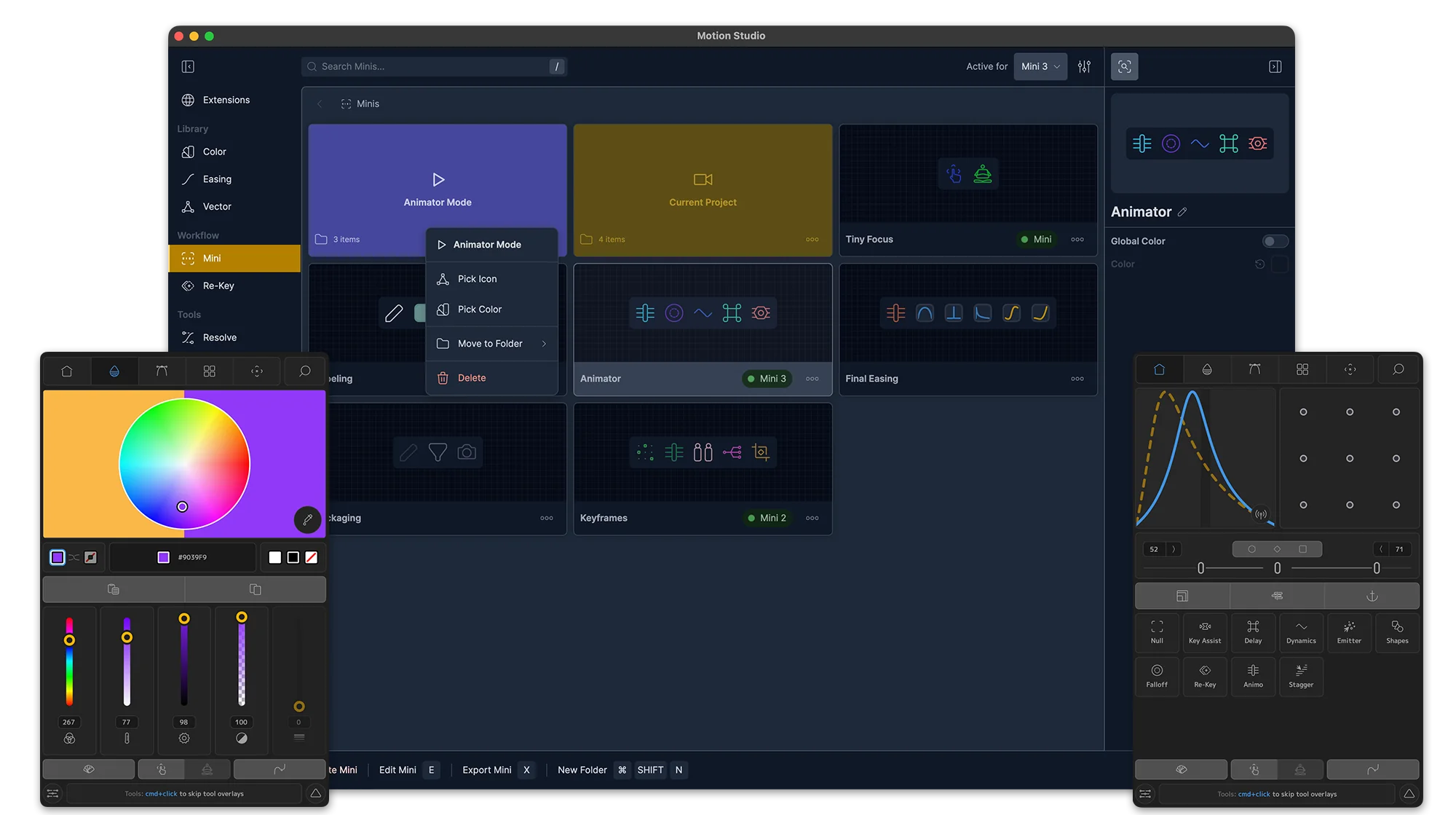
The standalone desktop app manages your entire setup: install and update extensions, organize color palettes and easing libraries, build custom Mini panels, browse open-source vector assets, and configure Re-Key presets. Also includes Resolve Ease for DaVinci Resolve users.
Settings
As usual with Mt. Mograph software, there are complete Preferences and Settings to customize.
Extensions
Motion Studio can be installed as a single panel, or opened as multiple extension panels.
Color
Organize, sort and manage all your color palettes.
Extensions
Motion Studio can be installed as a single panel, or opened as multiple extension panels.
Color
Organize, sort and manage all your color palettes.
Easing
Manage and re-order all your ease palettes and create folders.
Vector
Use a massive library of royalty free and open source vectors in any program.
Re-Keys
Manage and re-order all your Re-Key, rename and add custom icons.
Mini
Create and customize minimal companion panels for Motion Studio tool, swatches, palettes, system commands and more.
Resolve Easing
For DaVinci Resolve + Fusion users, enjoy an enhanced graph editor and easing toolset.
Create
Motion Studio is expanding to an entire suite of interactive simulation tools with instant renders and complete library.
Settings
As usual with Mt. Mograph software, there are complete Preferences and Settings to customize.
Animation Assistant
Studio-exclusive tools for advanced workflows: Re-Key saves and recalls keyframe libraries, Mini panels give you lightweight custom toolbars, and Key Assist auto-sets bulk keyframes with a property listener.
Key-Assist
Auto-set bulk keyframes with a "property listener assistant."
Re-Key
Save and re-apply keyframes in a custom library.
Minis
Customize a lightweight companion extension of your favorite tools, libraries and After Effects system commands.
Re-Key
Save and re-apply keyframes in a custom library.
Minis
Customize a lightweight companion extension of your favorite tools, libraries and After Effects system commands.
Key-Assist
Auto-set bulk keyframes with a "property listener assistant."

Users say
“Hands down the most useful plugin to speed up your basic workflow.”
Valentin Kiss
PLAION
“Motion is absolutely essential for every professional After Effects animator. I can't live without it.”
Devon G
“Motion helps me get through more work in less time. Since everything is urgent it's become a lifesaver and a necessity.”
Jon
Deep Sea Creative
“I can't tell how much lifetime Motion has saved me already. I'm using it every day and all of my important tools are just one click away, right at my fingertips.”
“I immediately notice if I've forgotten to install Motion”
Andrew H
“It's a total time saver! No longer do I have to hunt around for scripts or setup sliders.”
Jon
Wolde TV
“Motion is critical to my workflow and used on literally every project. Its rights so many wrongs that are inherently to After Effects. I've recommended it to everyone I know learning motion graphics.”
Matthew Marchini
@raisedby.tv
“I've been using Motion for years and it's the one plug in that i first install anytime im on a new machine or update my AE. I use so many parts of it but honestly i probably use the more of the simplest features and it just make my workflow so much faster.”
Tagori M V
“Motion is THE Swiss Army knife for a mograph professional. It's always the first plugin to be installed.”
Craig S
UpsideKiwi
“I find Motion an essential ser of tools that not only help me save time, but also help me standardize animations, and create with a single click. Every motion artist should have Motion a standard tool to use in every single project, every day.”
Vicente Iannone
@ Vicente Iannone - Audio-visual communication
“As a hobbyist saved me a lot of time”
Rob Hendriks
“Motion was always by my side as I learned After Effects throughout the years, and it continues to aid me every single day.”
Damian Chmielewski
@chhdamian
“A must-have for anyone looking to speed up their workflow.”
Tim
“OMG! I don't know what I would do without Motion and it's myriad of tools! Simple, elegant and irreplaceable. Motion is also my favorite was to use color palettes in After Effects, even better than tools dedicated to the task.”
Suzanne H
“I LOVE Motion, it's become a regular part of my workflow and it's saved me SO MUCH time. Animation takes a lot of time as it is so anything to help speed things up is fantastic. I would recommend it to everyone that uses After Effects regularly. I particularly love the Sort function as I am very messy with all my folders and comps, so I don't feel bad if other people have to work with my files any more!”
Vicky
Freelance
“Motion is my to go tool in almost every project workflow. It's a time saver, I can reach the tools I need from it's console and just makes the workflow a lot easier, been using it since Motion 1, and would use it for as long as I work in the industry.”
Capeto Carrion
Chunkytime
“Motion 1, 2, 3, 4 have saved me so much time. And not only that, it's tools boost what I want to achieve creative side. Delay, Excite, Dynamics are my favorites. The color and ease panels are so integrated with my workflow that without it it's not AE anymore. Ps. Could be edited for better gramar.”
Rubens koerich
Rubens Koerich - Motion Design
“Motion is basically THE THING if you are a motion designer with high volume of deliveries. And if not, you gotta use it because it's the best script out there to improve your workflow. Period.”
Felipe Dias Pereira
Felipe DP Motion
“Motion has been my go to tool for working efficiently, faster and more fluid. Giving back time to focus on creativity and flexibility for projects.”
Eelco Viel
@EVIEL
“My best companion in the animation-making process. Fully recommended.”
Marcel
Mandrill Studio
“I use Motion about 5 years, the improve in my workflow are amazing, grate save time, Motion Is a necesary Tools for any motion designers.”
Alexander Bizzarro
Alexander Bizzarro
“I use Motion on a daily basis. It makes my job easier. It's just a must have!”
Christopher G
Publicis Groupe Belgium
“Motion is essential to every single animation I Create, I use it in my day job. I use it in my side projects. I use it in my YouTube tutorials. It goes everywhere I go. It's the very first plug-in. I install when there's a fresh after effect update”
Ivan witteborg
@motionUX
“I got Motion way back when Motion 2 came out and its genuinely restructured so much of what I do, its crazy. It's so hard to ever try and use a fresh install were I don't have it.”
Nik J
freelance
“i use motion and its awesome when it works”
aaron
Motif